Posts

Showing posts with the label Photoshop

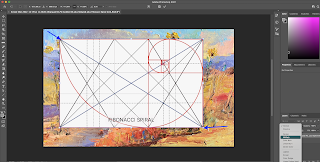
How To: Overlay a Grid on an Existing Image using Photoshop
Image
Introduction It's helpful to have your grids in a folder on your computer that is easily accessible. Construction 1.Select an existing painting to be overlaid with a grid and drag it to Photoshop (or open it with Photoshop). 2. Find the desired "PNG" grid for the overlay on your painting. (See other posts for instructions on the creation of this particular hand-made grid), 3. Drag it over your painting image in Photoshop.  Sometimes the painting image itself has a color profile that doesn't allow an overlay. In this case do a Screen shot of the painting jpeg image (see below for instructions) to convert it to a png without the color profile and start over. 4. Stretch the overlay to fit the painting by grabbing the corners and dragging to the image corners. But be careful not to change the proportions (don't hold the shift key for this procedure). 5. Convert it to transparent by changing the setting in the layer from "normal" to 'multiply'.  If th...
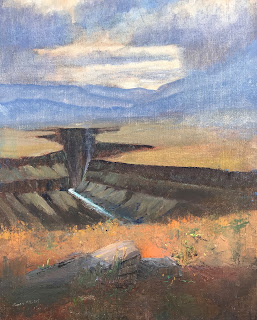
Analysis of Taos Gorge Fusion

Image
  Taos Gorge Fusion, 20x16, oil I did not use a Dynamic Symmetry Armature during the design of this painting. I decided to analyze the design against an armature to see how the painting could be improved - or not. First I layered a Dynamic Symmetry Armature plus Rebated Squares on the painting as is: Taos Gorge Fusion with Dynamic Symmetry++ Armature Visit my website to read the Description of this painting. In the description I remark on the inspiration artists have derived from this gorge's configuration; it does lend itself to analysis via an armature.  However, I can see several points to make: if the brightness of the sky is to be a focal point, it's not close to our usual focal points: the intersections of diagonals and their reciprocals.  In fact, though, perhaps a better focal point would be within the gorge itself. I do see an alignment of edges of the canyon with the armature. Also note the parallel of the river with a reciprocal line.  But I decided to ana...