Posts

Showing posts with the label iPhone

iPhones, Tools, Grids and Plein Air Painting

Image
 In my quest to learn everything about how we can use an iPhone effectively when setting up for a Plein Air Session, I learned a lot. I hope what I have learned can be as helpful to my readers as it has been for me. I wrote this post while staying in San Diego near my son's house in Jan 2023. I took the photo of the view from the back patio.  I just read through the post (Jun 11) and rather then try to perfect it, I think it has enough useful information to publish the post.  June 11, 2023: originally published, republished Jan 31, 2026. iPhone Editing/Cropping and Aspect Ratios Tip #1. iPhones automatically take photos at a 9x12 (horizontal) or a 12x9 (vertical) ratio by default but it can be changed (see tip #2).  For the WISE Apps' Dynamic Symmetry grids described below use the 3 to 4 OR the 2 to 3 ratio OR a Golden ratio. I  have tried to edit a photo to my desired measurements incorrectly.  This leads me to .. Tip #2. The edit/crop tool provides a set ...

Snapseed App for the iPhone- How to add a grid to your painting or photo

Image
A Simple free Tool for your iPhone for overlaying a grid on your photo or your painting,  You don't have to use Photoshop!! All the information is here:  https://www.wikihow.com/Overlay-Pictures-on-iPhone . Or go to the app store and download the Snapseed app (free). Basic Steps with an Example  See Detailed Steps below.  Snapseed app, load an image. or take a photo to be overlayed.  In this example I selected a photo previously cropped to a 3:4 aspect ratio (9x12),   Then in the double exposure option in the app I add a 3x4 Dynamic Symmetry++ grid, pulled from my albums.  3. Resulting combined image with grid superimposed. I did adjust the opacity of the grid layer in the app (see details below).  Now, one can sketch this directly on a 3x4 "gridded" card as a study or 9x12 "gridded" canvas. Refer to the post on a detailed application in the field. Detailed Steps with the same Example: Detailed steps in the Snapseed app, applying the simple D...

Wise Photo App Revisited

Image
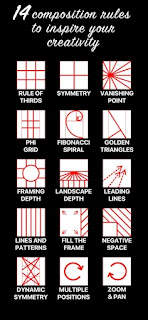
The Wise Photo App is available on the iPhone or iPad to apply overlays of 'rules' to your photographs or painting images on the device. Some examples applied to a well-known painting image are provided below. But there's a caveat that took me a while to figure out completely. The app changes the proportion of the photo to fit the grid as explained below.  (I even communicated with the main technician about this; he said that he didn't expect someone to apply two types of grids to the same photo. I was interested in comparing a dynamic symmetry grid with a PHI grid to see the difference. But more than this though is the changes made to the image provided unless it fits exactly a certain proportion). I've experimented with the Wise Photo App at length and it's great fun!! Here's a link to order it:  https://apps.apple.com/us/app/wise-photos/id1406085029  (the first two rules are free from apple; otherwise it costs a few dollars) for the iphone or the ipad. An...